
Starting the Server
Launch the Weavr server to access the web interface and API.
node weavr.mjs serveOpen http://localhost:3847 in your browser.
Dashboard
The dashboard provides a comprehensive overview of your Weavr instance:
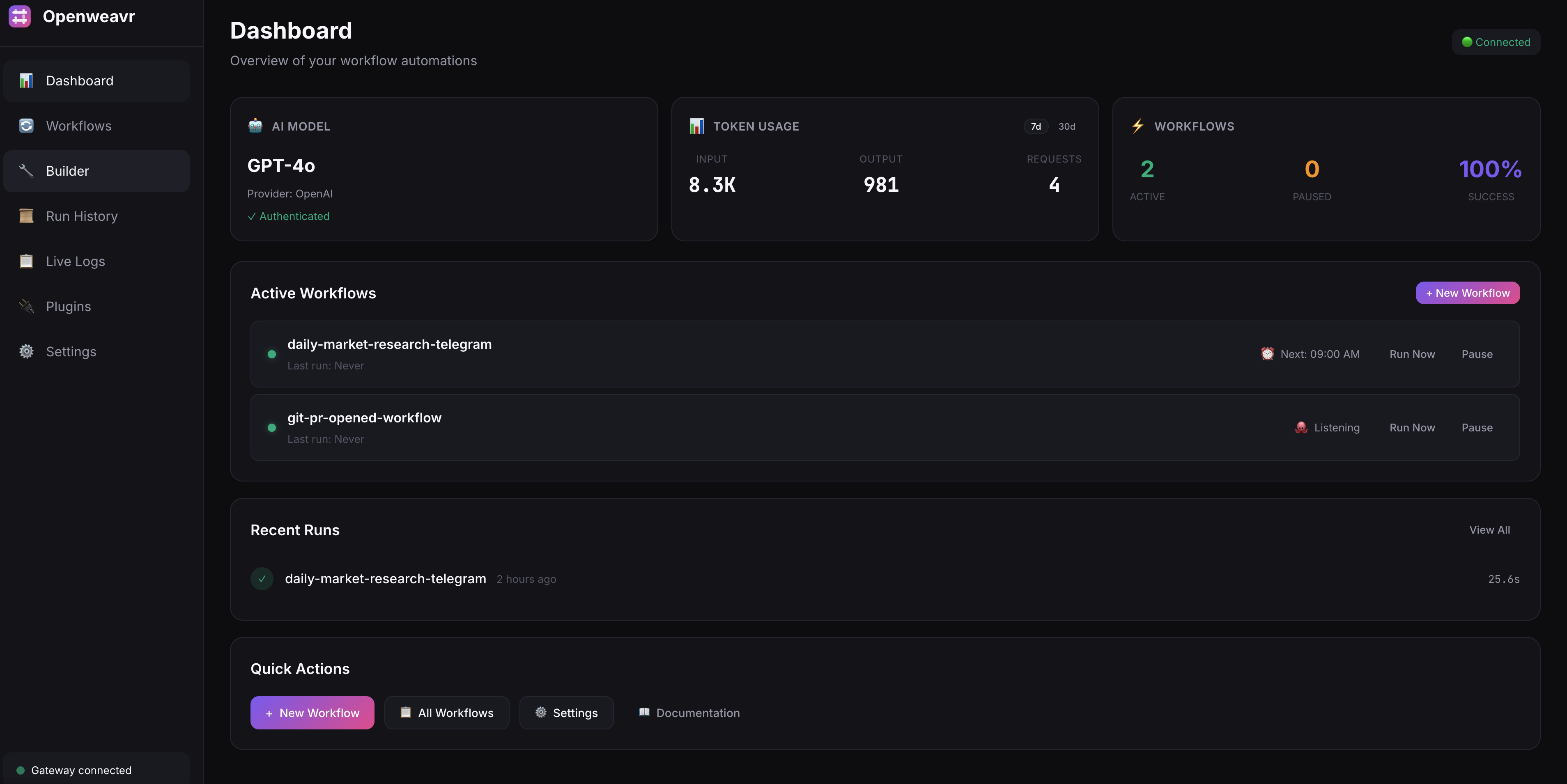
Key Features
- AI Model - Shows your configured AI provider, model, and authentication status
- Token Usage - Tracks input/output tokens and API requests across all AI operations
- Workflows - Displays active, paused, and total workflow counts with success rate
- Active Workflows - Lists deployed workflows with status, triggers, and quick actions (Run Now, Pause, Resume)
- Recent Runs - Shows latest workflow executions with status and duration
- Quick Actions - One-click access to create workflows, view all workflows, or access settings
Workflows
The Workflows page lets you manage your workflow definitions:
Viewing Workflows
Browse all workflows loaded from your workflows directory. Click a workflow to see its YAML definition and configuration.
Creating Workflows
Create new workflows directly in the web UI with the built-in YAML editor.
Running Workflows
Execute any workflow with optional input data. The UI shows real-time execution progress.
AI Workflow Assistant
The Workflow Builder includes an AI-powered assistant that helps you create workflows by describing what you want in plain English.
How to Use
- Open the Workflow Builder (create new or edit existing workflow)
- Click the AI Assistant button in the toolbar
- Describe the workflow you want to create
- The assistant generates YAML that you can review and apply
Example Prompts
# Create a new workflow
"Create a workflow that monitors a GitHub repo for new PRs
and posts a summary to Slack"

# Add steps to existing workflow
"Add an AI agent step that analyzes the PR diff
before posting to Slack"

# Use MCP tools
"Create a workflow that uses the filesystem MCP to
backup important files daily"
Available Tools
The assistant is aware of all available tools including:
- Built-in tools - web_search, http_request, read_file, write_file, etc.
- MCP tools - Any tools from enabled MCP servers (filesystem, git, database, etc.)
Settings
Configure your Weavr instance from the web UI.
AI Configuration
- Provider - Choose between Anthropic, OpenAI, Google, and 20+ other providers
- Model - Select from available models for your provider
- API Keys - Configure API keys (stored in local config)
MCP Server Management
Enable and disable MCP servers in real-time without restarting the gateway. The Settings page shows a catalog of 20+ pre-configured MCP servers:
| Category | Servers |
|---|---|
| Filesystem | filesystem, everything-search |
| Git & Code | git, github, gitlab |
| Database | postgres, sqlite, mysql |
| Browser | puppeteer, playwright, browserbase |
| Search | brave-search, exa |
| Cloud | aws-kb-retrieval, cloudflare |
| Productivity | google-drive, slack, linear, obsidian |
| Dev Tools | sentry, sequential-thinking |
Dynamic Enable/Disable
Toggle MCP servers on/off directly from the UI. Changes take effect immediately:
- Enable - Server starts and tools become available to agents
- Disable - Server stops and tools are removed
- Status - Shows "running" or "not connected" in real-time
Run History
View the execution history of all workflows:
- Status - Success, failed, or running
- Duration - How long the run took
- Step details - Individual step outputs and errors
- Logs - Full execution logs for debugging
Chat Interface
Interact with an AI agent directly from the web UI. The chat interface supports multi-turn conversations and can execute workflows on your behalf.
REST API
The server exposes a REST API for programmatic access.
Endpoints
| Method | Endpoint | Description |
|---|---|---|
| GET | /api/workflows | List all workflows |
| POST | /api/workflows | Create a workflow |
| GET | /api/workflows/:name | Get workflow details |
| POST | /api/workflows/:name/run | Execute a workflow |
| GET | /api/runs | List all runs |
| GET | /api/runs/:id | Get run details |
| GET | /api/config/status | Check configuration status |
| GET | /api/stats | Get dashboard stats (AI config, token usage, workflow counts) |
Examples
List Workflows
curl http://localhost:3847/api/workflowsRun a Workflow
curl -X POST http://localhost:3847/api/workflows/hello-world/run \
  -H "Content-Type: application/json" \
  -d '{}'
Run with Input Data
curl -X POST http://localhost:3847/api/workflows/process-data/run \
  -H "Content-Type: application/json" \
  -d '{"input": {"file": "data.csv"}}'
Create a Workflow
curl -X POST http://localhost:3847/api/workflows \
  -H "Content-Type: application/json" \
  -d '{
    "name": "my-workflow",
    "yaml": "name: my-workflow\nsteps:\n  - id: greet\n    action: log\n    with:\n      message: Hello!"
  }'
Check Run Status
curl http://localhost:3847/api/runs/run_abc123